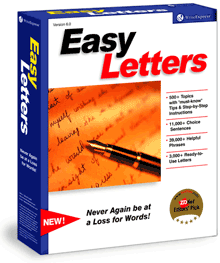
Put a powerful, comprehensive set of letters to work for you!
Writing a letter is a very challenging task. How many times have you delayed, revised, started and stopped, or wanted expert help? Everyone knows how to write, but only a few know how to write well.
- We did the research, writing & editing for you
Easy Letters is award-winning software for anyone who writes letters but does not have the time to research specific topics or the money to hire a professional writer.
- Enjoy instant success
Quickly learn how to start your letter courteously, say the right things, express yourself with style, sound polished and professional, and end your letter with class.
- Get only the best letters
We separate mediocrity from excellence and judge each letter by dozens of linguistic rules and advanced writing guidelines. With content written by expert writers who know structure, grammar, and punctuation, you can write with confidence!
- Master letter-writing skills
Best of all, your own writing skills will improve as you are exposed to good writing.
What's Included:
560 researched topics. 2,200 ready-to-use letters. 11,000+ choice sentences. 39,000+ powerful phrases.
|
|
With Easy Letters You Can:
Write like a professional—We offer you quality letters so you'll never be at a loss for words again.
Create your own top-quality letters—We give you user-friendly, step-by-step instructions, along with thousands of sample sentences and phrases.
Handle business correspondence with confidence—With Easy Letters at your fingertips, you can quickly handle hundreds of writing tasks with skill, knowledge, and confidence.
Save valuable time and effort—We provide a powerful search engine so you can find the topic, the right phrase or sentence to express every idea perfectly.
Save money—You can create effective professional correspondence without paying high-priced writers.
Insert letters directly into Microsoft® Word—Easy Letters works with all Windows 7, Vista, XP, 2000, 98, 95, Me and NT word processors and installs on the Add-Ins tab of Word 2007 and the Tools Menu of Microsoft Word 2003, 2002, 2000, 97, and Word 7.0. The Macintosh version may be used with Word via the clipboard.
Get a Deluxe Version for Just $10 More
3,001 Business & Sales Letters is our deluxe version of Easy Letters. You'll get all 2,200+ award-winning letters, plus 901 more sales letters to help you close those important deals!
NEW!—4,001 Business, Sales & Personal Letters is our most popular collection of letter-writing templates. You get more topics and more letters, plus 687 more love letters to express your feelings.
Windows FREE Gift: With a deluxe version you'll also Get our Rhyming Dictionary software and Phonetic Dictionary FREE!—a $19.99 VALUE! These powerful tools make rhyming fun and easy. Great for advertisers, songwriters, poets, teachers and kids! Note: These three programs are bundled together on a single CD or in one downloadable setup program. You get them all for one low price!
Macintosh FREE Gift: Get our Rhyming Dictionary software FREE when you order 3,001 Business & Sales Letters or 4,001 Business, Sales & Personal Letters.
Benefit from the Best Talent and Experience
Use the words of an experienced staff
We identify the most qualified writers and editors to write our letters. Our experts have advanced educational degrees and have worked as teachers, writers, and editors for several years.
Choose from a variety of writing styles
Each writer creates only a few letters per topic so you can choose the best words for your situation.
Enjoy advanced editing
Our letters are reviewed at least twice by qualified individuals with several years of teaching and editing experience.
Top Ten Reasons to Choose Easy Letters:
#10 We've done the research for you.
#9 We provide the words of an experienced staff.
#8 You get peace of mind.
#7 You project professionalism.
#6 You learn how to write independently.
#5 You choose the writing style you like.
#4 You get only the best letter examples.
#3 You gain the confidence to express yourself.
#2 You get the best talent working for you.
#1 The process is easy and you are guided every step of the way.
Reviews
"Even if you're a great writer, it's always good to get a second opinion, and Easy Letters should help you ensure your letters always convey exactly the right message."
—PC Guide
"The best dictionary in the world isn't much help when you don't know what to write in the first place. Ever try to compose an acceptance letter for a job offer, a complaint about a billing error, a recommendation for a coworker or a resignation letter? You have ideas about the content, but it would be much easier if you had an example in front of you."
—USAToday.com on Easy Letters
"...tremendously helpful for writing difficult, sensitive letters."
—Belva Burgess, Professional Secretary
"Finally, someone is helping me write well" —Scott Faulring, Editor
"It's all simple to use...a well thought out and effective tool...we like it a lot."
—PC Guide
"The business side of our company uses Easy Letters to build our positive image in the world of publishing."
—Hartford Courant Newspaper
How it Works
Instead of starting at a blank screen, Easy Letters gives you the words you need in three easy steps:
1. Browse TopicsBrowse through an outline of letter-writing topics, looking for the one that best suits your needs. Found it? Select the individual topic, and then click Next. |
2. Select ExampleYou'll find a least four example letters covering your chosen topic. Read them carefully and then highlight the one that most closely matches your situation. |
3. Insert LetterWhen you click the Insert button, Easy Letters will paste the text into Microsoft Word for Windows where you can edit and format your letter. If you use Macintosh or have a different word processor, you can still run the program and use the clipboard to copy and paste text into your document. |
More Information
System Requirements
Easy Letters works with all Windows 7, Vista, XP, 2000, 98, 95, Me and NT word processors and installs on the Add-Ins tab of Word 2007 and the Tools Menu of Microsoft Word 2003, 2002, 2000, 97, and Word 7.0. The Macintosh version may be used with Word via the clipboard.
| Windows |
|
| Platform: |
|
Windows 7, Vista, XP, 2000, 98, 95, NT, or Me |
| CPU: |
|
Pentium® processor or faster |
| RAM: |
|
4 MB available RAM |
| Disk Space: |
|
6 MB available disk space |
| Display: |
|
640x480 Display, 16-bit color or better |
|
 |
| Macintosh |
|
| Platform: |
|
Macintosh Snow Leopard, Leopard, Tiger, Panther, 10.x or 9.x with Carbon |
| CPU: |
|
Intel or Power PC |
| RAM: |
|
3 MB available RAM |
| Disk Space: |
|
16 MB available disk space |
|
Windows Download Times (9.5 MB)
|
| Cable (1.5 Mb): |
|
50 seconds |
| DSL (512 Kb): |
|
2 minutes, 27 seconds |
| 56 Kbps: |
|
22 minutes, 15 seconds |
|
|
Mac Download Times (5.62 MB)
|
| Cable (1.5Mb) |
|
29 seconds |
| DSL (512 Kb) |
|
1 minute, 27 seconds |
| 56 Kbps |
|
13 minutes, 14 seconds |
|
Shop With Confidence
|
Shopping Services
|
We are Here to Help
|
Home | About Us | Affiliates | Awards | Contact Us | Español | FAQ | Jobs | Products | Sample Business Letters | Site Map | Support
© 1996-2010 WriteExpress Corporation. All rights reserved. WriteExpress® and Unblocking Writers' Block® are registered trademarks of WriteExpress Corporation.
|